How to block a dialogue 2-shot
A worked example with real numbers — 35mm at seven feet, eye-level on seated subjects, and the geometry that decides whether the cut to coverage works. Plus a Previs Pro scene file you can open and adjust.
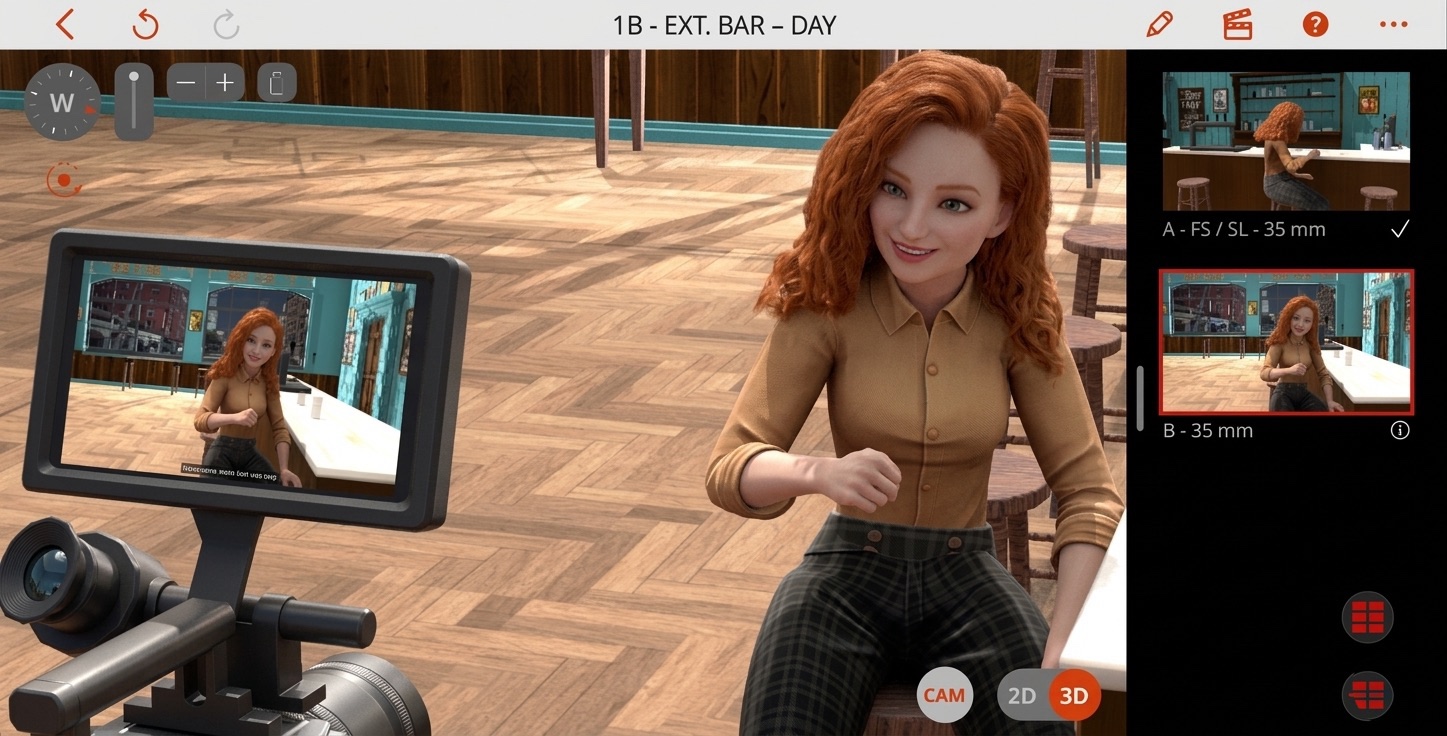
A 2-shot of two people talking is, statistically, the most common shot in narrative film. It is also one of the easiest to get wrong, because the failure mode isn't visual — it's geometric, and the geometry doesn't reveal itself until you cut from the master to the singles and the space inverts. By that point the actors have wrapped, the location is gone, and the only fix left is in the edit.
Previs is where you catch it. This page walks through one specific dialogue 2-shot — the numbers, the geometry, the lens choice — with the reasoning behind each decision. Open the same scene in Previs Pro, change the lens, move the camera, and watch where the geometry breaks.
The 2-shot doesn't fail in the master. It fails on the cut.
The geometry of a 2-shot
Three rules of geometry decide whether a dialogue scene cuts cleanly. None of them are aesthetic — they are spatial, and the audience reads them subconsciously the moment a cut lands.
The 180-degree line
An imaginary line runs between the two subjects. The camera lives on one side of that line for the entire scene, unless a deliberate camera move (a dolly, a character crossing, a motivated re-block) carries the audience across it. If the camera silently jumps the line between the master and a single, the cut reads as the actors swapping seats. The audience doesn't know what's wrong, only that something is.
Eye-trace — the 25-degree cant
If both subjects sit perfectly square to each other, their gazes run parallel. Parallel gazes read, on screen, as two people staring past each other — even when the geometry says they're looking at each other. The fix is small and consistent across thousands of shots: cant each subject roughly 25 degrees toward camera. Both faces show in three-quarter profile. The eye-trace lines now cross in front of the lens, and the audience reads connection.
Camera height
Seated dialogue shot from a standing camera reads as surveillance. Standing dialogue shot from a low camera reads as intimidation. The neutral height for conversation is the subjects' eye level — for seated adults, around 44 inches off the floor. Off by six inches in either direction, and the audience feels watched or talked-down-to without being able to say why. The numbers are unforgiving.
Lens choice: 35mm vs. 50mm vs. longer
A wider lens shows the room. A longer lens shows the face. That's the trade in one sentence; everything else is taste.
- 35mm full-frame equivalent — the indie naturalistic default. Wide enough to keep both faces and the room in frame, narrow enough that backgrounds don't warp. Use it when the location is part of the scene.
- 50mm — closer to natural human vision. Faces flatten slightly, backgrounds compress slightly. The classical dialogue lens, and the safest choice if you don't have a strong reason for something else.
- 85mm and longer — portrait lenses. Backgrounds dissolve into texture; the face is the entire shot. Reserve for emotional emphasis. If you shoot every dialogue scene at 85mm, you've made every dialogue scene about the same thing.
The worked example below uses 35mm. In Previs Pro, swapping to 50mm or 85mm and re-blocking the camera takes seconds — that is, in fact, what previs is for.
The worked example
Two characters seated at a small table, a conversation. Generic enough to be a coffee shop, a kitchen, a cell, a confessional. Here are the numbers used in the scene file.
| Lens | 35mm full-frame equivalent |
| Camera distance | 7 ft from the closer subject's eye |
| Camera height | 44 in (seated eye level) |
| Subject spacing | 3 ft eye-to-eye, across a small table |
| Subject cant | ~25° toward camera |
| 180-degree line | Through both subjects, parallel to the table edge facing camera |
| Headroom | Subjects' eyes on the upper-third line |
The reasoning, briefly:
- 35mm at 7 feet renders a medium 2-shot — both subjects from chest up, with a foot of room above their heads and the table edge visible at the bottom of the frame. Far enough back that 35mm's mild geometric distortion doesn't elongate the closer subject's face.
- 44 inches is the seated eye-line. Six inches higher and the audience is looking down on the scene. Six inches lower and the framing tips toward melodrama.
- 3 feet between subjects is conversational distance — close enough to read connection, wide enough that both faces sit clearly in the 35mm field without one occluding the other.
- 25-degree cant is the smallest cant that reliably produces convergent eye-trace. Less, and the gaze runs parallel. More, and the actors look like they are playing to camera.
- 180-line through the subjects means the camera is on one side of the table for the entire scene. Coverage (over-the-shoulders, singles) all stays on that side. If a later shot needs to cross the line, it does so on a motivated move — a character standing, a focus shift, a deliberate re-block.
Watch on YouTube → · Shot Framing · 2:20 · Previs Pro Shot School
Block it yourself
Open Previs Pro and try the scene
The blocking above takes about ninety seconds in the app: drop two characters, place the camera, set the lens, hit playback. Change any of the numbers — lens, camera height, subject cant — and the geometry responds in real time. That's the whole reason previs exists.
The free tier unlocks the full 3D blocking, AI generation, editorial timeline, and screenplay import. Exports carry our watermark until you upgrade; everything else is open.
Where most 2-shots go wrong
A short checklist, in order of frequency.
- Camera too high. Shooting seated subjects from standing camera height. The fix is always the same — drop to eye level. Always.
- Eye-trace runs parallel. The actors are square to each other instead of canted toward camera. The audience reads disconnection.
- The master is symmetrical. Both subjects framed identically, equidistant from the lens axis, no foreground priority. The cut to singles becomes confusing because both characters look the same in the wide.
- Lens too long. 85mm on a dialogue 2-shot turns the room into wallpaper. You lose the location, and the location was paying for itself.
- 180-line crossed without motivation. The wide is shot from one side of the table, the singles from the other. On the cut, the actors flip seats. Audience never recovers.
Each of these is the kind of thing a director-of-photography catches on set in twenty seconds. In previs, you catch it the first time you cut the master against a single and feel the space pop. That is the entire reason previs exists.
If you're still picking a previs tool for this kind of work, our comparison of nine previs and storyboarding tools indie filmmakers are actually using in 2026 covers what each one does and where each one stops.
Fix it in pre. 🎬