Previs Tool Comparison 2026
Nine tools indie filmmakers are actually using, what each one does, and where Previs Pro fits. Every claim linked to its source.
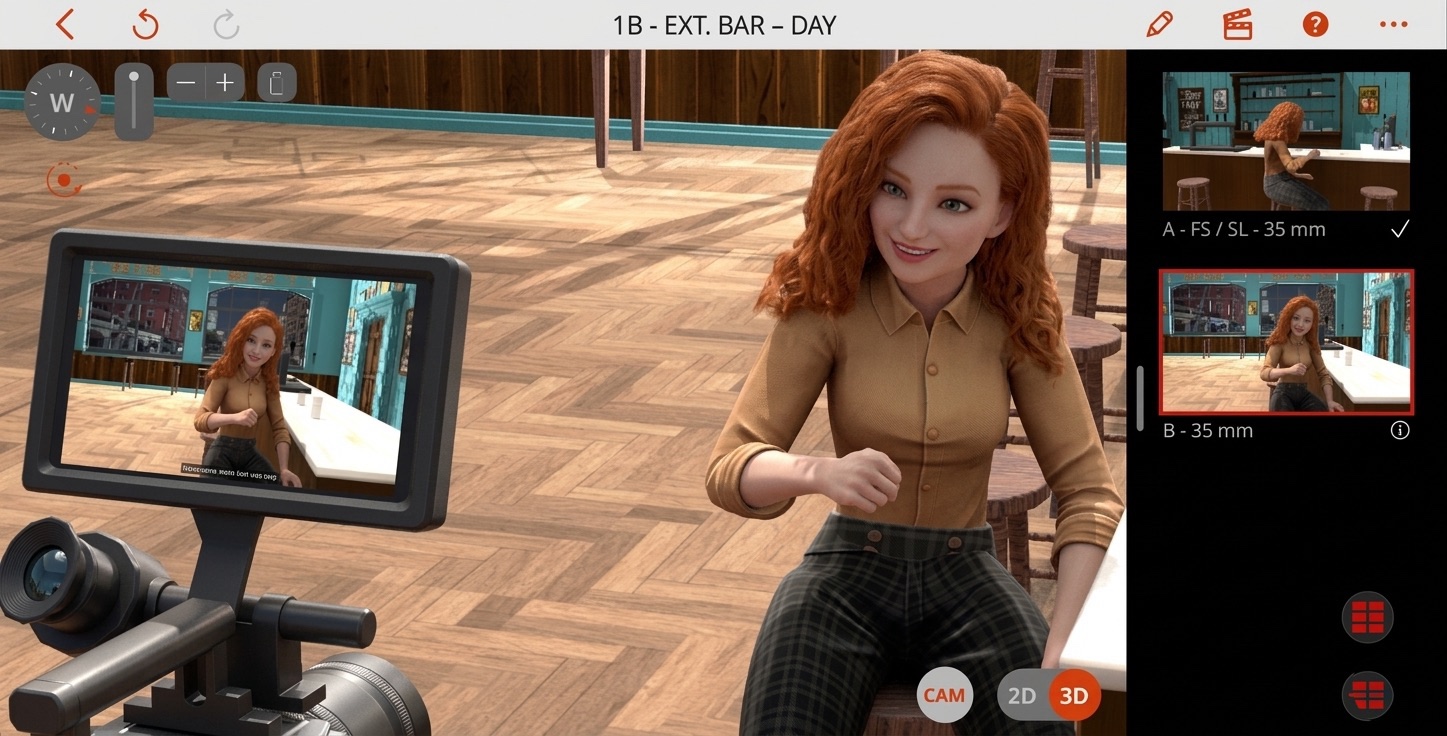
There are more previs and storyboarding tools now than there have ever been. A new one appeared last month. Another the month before that. Most of them are good at one thing and silent on the rest, and the marketing copy rarely tells you which is which.
We thought the most useful thing we could publish was a comparison where every claim — about us and about everyone else — is traceable to a public source you can check yourself. So that's what this is. If we say a tool starts at $X per month, there's a link to the pricing page. If we say a tool doesn't do 3D scene composition, it's because we read their feature list and 3D scene composition isn't on it. Chapter and verse.
We make Previs Pro, so we're obviously not neutral. But the whole point of the comparison is that we don't need to be unfair to be confident.
The tools in this space have mostly drawn clear lines around what they do, and nothing we're about to write should be surprising to the teams who built them.
One quick note up front: Previs Pro has a free tier, so nothing below is going to ask you to spend money to try us. There are real limits — you'll need to sign in, exports come with our watermark, you can't swap it for your own logo, and the keyframe Animatics Mode is capped at one shot per project — but the 3D blocking, AI generation, editorial timeline, and screenplay import are all unlocked. If you're a student or on a first project, download it, open the Getting started guide under New user guides on the Projects home, and see for yourself while you read. We'll wait.
How this comparison was made
Tools were selected from three sources: filmmaker forums (r/cinematography, r/Filmmakers, Cinematography.com), our own support inbox at support@previspro.com (where users mention what they used before Previs Pro), and reviews on independent storyboard-software roundups from No Film School, StudioBinder, and PremiumBeat. No tools were included or excluded based on sponsorship — there is no sponsorship here. Pricing, platform, and feature claims were captured between April 28 and May 8, 2026, directly from each vendor's own pricing page, feature list, or app listing, and every claim in the table links to its source so you can verify it yourself. Previs Pro's own feature, model, and format details were re-checked against Previs Pro 3.6.0 on October 7, 2026; competitor details have not been re-verified since May 2026. Where a vendor's site was ambiguous, we erred on the side of the vendor (assumed the feature exists) and noted the ambiguity.
Key findings (May 2026)
The full comparison is below — table, source links, tool-by-tool reviews. If you only have a minute, this is what came out of it.
- Previs Pro is the only tool in this comparison that combines native 3D scene blocking with real camera optics, an editorial timeline with four audio lanes, AI image and video generation, multi-format screenplay import, FCP7 XML handoff to Premiere Pro and DaVinci Resolve, and team review on the web — in a single app, native on Mac, iPad, and iPhone.
- FrameForge has not shipped a major feature update since December 2019. The 3D blocking and lens math are still solid; everything else around it has stood still while the category moved on.
- ShotPro's last substantive feature addition (primitive shapes) was July 2020. Closest tool to Previs Pro's spatial approach at $39.99 one-time, but no AI generation, no editorial timeline, no screenplay import, no Mac app.
- The AI-first generators (LTX Studio, DrawStory AI, Storyboard Hero, Cinetech) skip 3D blocking entirely. Strong on prompt-to-frame generation; not designed for crews who need to block a real shot in a real space with real camera physics.
- Previs Pro pricing: free with watermark, $119.99/year (about $10/month), $39.99/month, or $359.99 lifetime — less than every subscription tool in the table, including the ones with no 3D and no timeline.
The landscape at a glance
The storyboard-and-previs category has split into three broad camps over the last few years: AI-first generators, storyboard SaaS, and free open-source tools. Here's where each one stands today.
| Tool | Yearly cost | 3D + real camera | AI generation | Editorial timeline | Native mobile |
|---|---|---|---|---|---|
| Previs Pro | $119.99/yr | ✓ | ✓ | ✓ | Mac · iPad · iPhone |
| LTX Studio | $144/yr | — | ✓ | — | Web |
| DrawStory AI | $228/yr | — | ✓ | — | Web |
| Storyboard Hero | ~$228/yr | — | ✓ | — | Web |
| Cinetech | ~$470/yr | — | ✓ | — | Web |
| Boords | $900/yr | — | ✓ (image) | 2D animatic | Web |
| Canva Pro | $144/yr | — | general | — | Web |
| FrameForge | $498 once | ✓ | — | — | Mac/Win |
| ShotPro | $39.99 once | ✓ | — | — | iPad · iPhone |
| Storyboarder | Free, OSS | — | shot ref | — | Mac/Win/Linux |
All prices verified directly from each vendor's pricing page, April 2026. Sources listed in the footer.
The AI-first generators · Updated
Examples: LTX Studio, DrawStory AI, Storyboard Hero, Cinetech.
What they're good at
Speed. You feed one a prompt — sometimes a whole script — and it returns stylized frames in under a minute. If you need ten mood-board panels for a pitch deck by lunch, this is the shortest path there. Pricing tiers are in the chart above.
What they actually are
Thin front-ends on image and video generation models. Each tool wraps a generator in a workflow UI — project organization, prompt history, character consistency tracking, sometimes shot lists — but the underlying model is doing the creative work. The same models any of us can access directly: Midjourney, Sora, Google's Nano Banana, and the open-source weights everything else is built on. The middleware adds organization. The model adds the picture.
What they don't do
Spatial composition. In these tools, your "camera" is a text prompt, not a camera. Yes, most of them let you seed a generation with a reference image — but that just pushes the problem up one level: where does that image come from? If it carries your actual blocking — the exact angle, the lens feel, the spacing between characters, the eyeline geometry — something upstream had to compose it. A generator can riff on a frame you already have; it can't invent one that honors a scene you haven't built yet. There's no 3D space you're looking through. No lens choice with real focal length. No overhead view to check whether your reverse has room to land. The frame exists; the space the frame was pulled from does not.
That's fine if you're sketching mood — and these tools are legitimately good at that — but the moment you need to plan coverage, check eyelines, or reason about where the camera actually sits, you're hitting the limit of what a generator can tell you. Prompts aren't blocking.
Where we differ
Same models, different position in the stack. Inside Previs Pro, the AI runs on top of frames you composed in 3D — a styling pass over the spatial work, not a replacement for it. You can also sketch a frame from a text prompt when all you need is a placeholder, but blocking in 3D is what the rest of the app is built around. The spatial layer is where we start; the model is what comes next.
Storyboard SaaS
Example: Boords.
Boords is the most mature team-collaboration storyboard tool in the market. If you're running a commercial shop with a client-approval workflow, it's a serious option. Their Standard tier is $49/month for a single user, and their Workflow tier is $99/month. Both tiers charge $15/month for each additional seat. Verified April 2026.
Canva Pro — $144/year for one person, about $12/month annualized — has storyboard templates and a large template ecosystem. It's a general design tool with a storyboard option, not a film-specific one. For comparison: Previs Pro's annual is $119.99/year, lower than Canva Pro's annual, for a film-specific tool instead of a generalist one.
What they don't do
3D scene composition. Both are 2D-first tools — you're drawing or generating flat frames and arranging them on a board. If you need to plan a dolly move through a real set, or check what a 35mm prime sees from a position versus an 85mm from the same spot, you're working outside the tool.
Our angle
Previs Pro is not trying to compete with Boords on 2D team collaboration — they're better at that specific thing, and they've had more time to build it. What we do that they don't is let you block the scene in 3D first, before any frame exists. The frame is a byproduct of the spatial work, not the starting point.
3D previs tools · Updated
Examples: FrameForge, ShotPro.
These are the only other tools in the market that actually give you a 3D space with a virtual camera. That puts them in a fundamentally different category from everything above — you're composing shots spatially, not prompting for them. We respect both for that reason.
FrameForge
FrameForge Storyboard Studio — Emmy and Lumière award winner. Core edition is $498.95 one-time (or $12.99/month); Pro edition is $799 (or $24.99/month). Desktop only, Mac and Windows. It does real lens math and optically correct previsualization — that's its core strength and they've been doing it longer than anyone.
The honest picture: FrameForge's current major version is Version 4, released in December 2019. There have been minor point releases since — bug fixes, 64-bit Apple Silicon compatibility — but no meaningful feature updates in over six years. Their support forum is mostly troubleshooting threads and feature requests; the "Suggestions & Wish List" section has 45 threads with 138 posts. The product works, and the optical engine is serious, but it is not actively evolving.
No AI generation. No editorial timeline. No audio. No mobile version. No team review. No screenplay import. If you need optically correct 3D blocking on a desktop and nothing else, FrameForge is proven. If you need anything beyond that, the product hasn't moved in the direction of providing it.
ShotPro
ShotPro — $39.99 one-time on the App Store. iOS and iPadOS only (iPhone 6s+, iPad Air 2+). Won Videomaker's "Best Mobile App" in 2015. It's the closest thing to Previs Pro's spatial approach: 3D sets, posable characters, virtual cameras with focal length and depth of field, lighting, 2000+ props, and .mov export up to 4K with audio.
ShotPro hasn't had a significant feature update in over two years. The current version is 4.11.1; the last substantive feature addition (primitive shapes) was July 2020. No AI generation, no editorial timeline, no screenplay import, no team review, no Mac app. The core 3D blocking works, but the product has been effectively static while the rest of the category has moved on.
Where we differ
Previs Pro starts from the same premise — a 3D space with a real virtual camera — but layers everything else on top: AI image and video generation (three image models and two video models, plus voice, music, and SFX), an editorial timeline with four audio lanes, screenplay import (Final Draft, Fountain, OSF, Fade In, Celtx, and text-based PDF on Mac), FCP7 XML handoff to Premiere Pro and DaVinci Resolve, team review via the web, and native apps on Mac, iPad, and iPhone. The development velocity tells the story: in the time since FrameForge and ShotPro last shipped a major feature, Previs Pro has shipped the Timeline, AI generation (images, video, TTS, music, SFX), the Audio workspace, the Screenplay Manager (now in the Breakdown tab), team review, AI-generated 3D characters and props, the Character Creator, NLE export, a credit system, and — in 3.6.0 — the Boards tab, AI coverage suggestions from the script, AI Studio, and guided new-user tours. The 3D foundation is shared; everything built on top of it is not.
Where Previs Pro fits · Updated
Previs Pro is the only tool we know of that combines all eight of these in one app — running natively on Mac, iPad, and iPhone, so the project you start on a laptop in the morning can go with you to set on an iPad or iPhone in the afternoon:
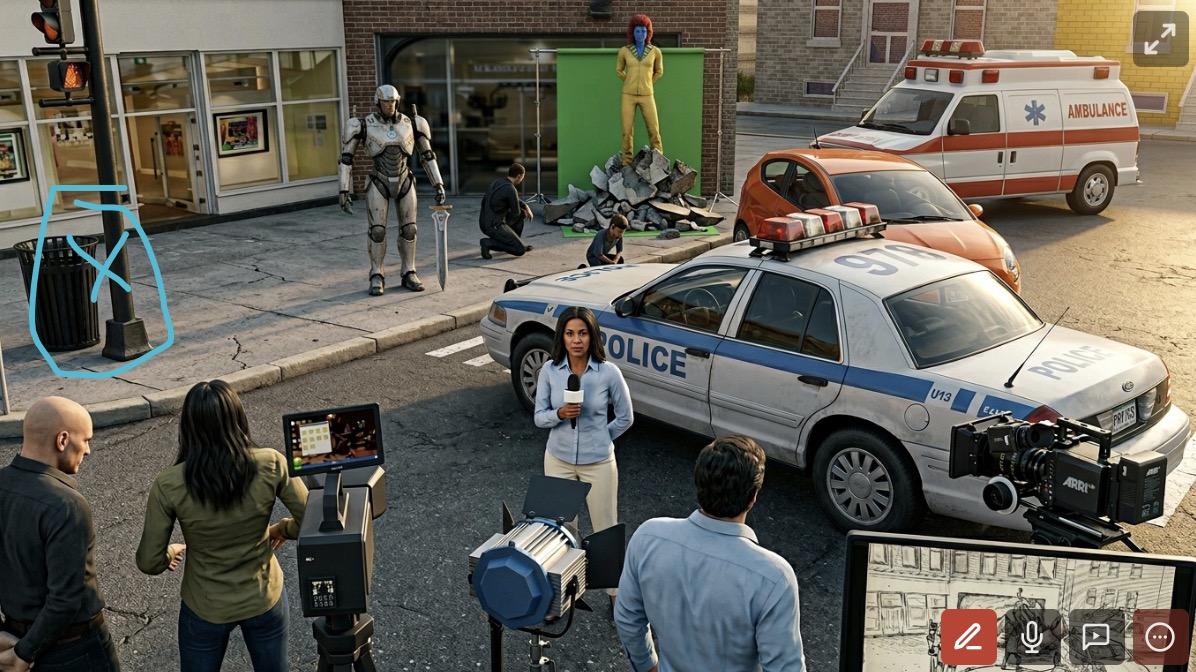
- Start from the script. Drop in a Final Draft, Fountain, OSF, Fade In, or Celtx file — or, on a Mac, a text-based PDF — and the Breakdown tab fills with your scenes, cast, and locations, with a 3D character picked automatically for each cast member. You're not staring at an empty project — the structure of the screenplay becomes the structure of the previs. On the Boards tab, Suggest coverage proposes a shot list for each scene, with a "Why these shots?" explanation, and you edit it in the Coverage overview before it becomes shots. When the script changes, Import revision shows you what changed and lets you review it scene by scene before anything is applied.
- Block the scene in 3D with real camera physics — lens focal length, camera sensor (Full frame 35mm, Super 35mm, Alexa LF Open Gate, Alexa 65, Alexa 265, Blackmagic URSA Cine 17K 65, Canon and Nikon APS-C, Micro 4/3, Standard 16mm, Super 16mm, and more), anamorphic squeeze from 1.3x to 2.0x, depth of field, composition guides. Place characters, walk the camera through the set, find the shot. Documented in full on the wiki.
- Step into the real location with AR. On iPhone or iPad, AR mode lets you stand in the actual space and see your virtual blocking on top of it — before your crew shows up.
- Add motion with Animatics. Keyframe cameras and objects directly in the scene to turn a still shot into a moving beat — dolly in, pan, craning reveal. How Animatics Mode works.
- Generate AI imagery and audio on top of the 3D work, or sketch a frame from a text prompt when you only need a placeholder. Three image models (FLUX.2 Turbo, Seedream 4.5, Nano Banana 2), two video models priced per second of video (MiniMax H3 Max and MiniMax H3 2K), plus voice, music, and SFX. Sketch with AI works right on the board; AI Studio is the full workspace, with Create, Enhance, Touch Up, and Import tabs. When you enhance a shot you composed in 3D, that frame becomes the input the model riffs on, so your blocking survives the stylization.
- Cut it together in the editorial timeline. Four dedicated audio lanes (dialogue, music, SFX, voiceover), shuttle playback, transitions, and retiming. The 3.3.4 "Cut to the Chase" post has the full breakdown.
- Send it out for review via password-protected links on share.previspro.com — no app install required for reviewers. Notes come back threaded to the shots they're about.
- Hand the cut to your editor. The Export for NLE tab saves an FCP7 XML zip that opens directly in Premiere Pro and DaVinci Resolve — shots become clips, audio lanes survive the trip, scene-qualified filenames stay readable in the bin. The previs cut becomes the editorial spine of the actual edit.
No other tool we know of does all eight. Most do one or two.
Pricing
Free with watermarked exports — perfect for film students, first projects, and anyone who wants to test the full app before paying for anything. The free tier unlocks 3D blocking, AI generation, the editorial timeline, screenplay import, and team review — you just need to sign in. The limits: exports get our watermark, you can't replace it with your own logo, and the keyframe Animatics Mode (in-shot motion paths for cameras and objects) is capped at one shot per project.
To remove those limits: $119.99/year (about $10.00/month), $39.99 month-to-month, or $359.99 lifetime. Every account — free or paid — gets a starter allotment of welcome credits to try the AI generation features without spending anything.
Used by filmmakers at Lucasfilm, Marvel, BBC, Max, and Digitalfilm Tree, and by film programs at USC, NYU, and UCLA.
Where we're still weak · Updated
We said chapter and verse — here's where it cuts the other way.
- Apple-only. Previs Pro is native on Mac, iPad, and iPhone. If your production is built on Windows or Android hardware, we are not your tool and we won't pretend otherwise.
- AI generation costs credits on top of whatever tier you're on. Every account starts with welcome credits for AI generation; after those run out, credits are pay-as-you-go. Some tools in this list bundle AI into their subscription tiers instead. Different trade-offs, both defensible — we think pay-as-you-go matches how indie directors actually use AI, but reasonable people disagree.
- PDF scripts import on a Mac only. Previs Pro reads text-based PDF screenplays on a Mac. On iPhone and iPad, or with a scanned PDF that has no selectable text, you'll need a Final Draft, Fountain, Fade In, Celtx, OSF, or plain-text script instead.
That's the list we can think of that's worth a prospective user's time. If you're evaluating previs tools and something on this page doesn't match your experience, ian@previspro.com — we read everything.
How to pick · Updated
If you want:
- Pure prompt-to-frame generation, nothing else — at this point, just go to Midjourney, Sora, Google's Nano Banana, or whatever the top model is this week. The AI-first storyboard tools above are workflow wrappers around the same models — they organize the output, but the model is doing the creative work. If that's the workflow you actually want, you've made the AI your cinematographer; you might as well work with it directly.
- Team collaboration on 2D boards with client review — Boords. They've been refining this workflow for years.
- 3D blocking on a budget, no subscription — ShotPro ($39.99 one-time, iOS only). Solid 3D previs with a real camera, but hasn't shipped a major feature since 2020 and has no timeline, no AI, no Mac app.
- Optically correct 3D on desktop, everything else secondary — FrameForge ($498+ one-time, Mac/Win). Emmy-winning lens math. Last major version: 2019.
- Zero dollars, sketching only, no limits — Storyboarder. Fully free, 2D only, yours forever.
- You're a student or on your first project and you want the whole 3D-plus-AI-plus-timeline app for free — Previs Pro free tier. Sign in, and everything is unlocked except two things: the keyframe Animatics Mode is capped at one shot per project, and exports carry our watermark. Upgrade later only when you need clean exports or unlimited keyframe motion.
- A full previs pipeline that blocks in 3D, generates storyboard frames straight from your camera, cuts it all together with audio, and runs on a tablet you can take to set — Previs Pro paid. $119.99/year, $39.99 month-to-month, or $359.99 lifetime. Less than every subscription competitor in the table — including tools with no 3D and no timeline.
Every claim on this page is linked. If we got something wrong — or if a competitor's pricing has changed since April 2026 — tell us at ian@previspro.com. We'll update the post.
Fix it in pre. 🎬